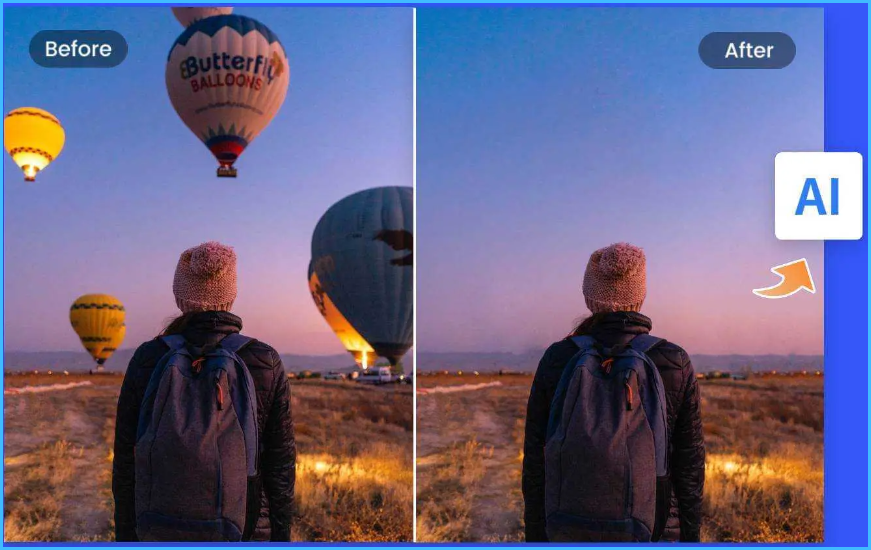
Are you tired of seeing unwanted objects in your photos? Whether it’s a random person in the background or a stray animal, these objects can ruin the aesthetic of your image. Fortunately, there are now several apps available that can help you remove these objects from your photos using artificial intelligence (AI) technology.
One such app is SnapEdit, which allows you to remove objects from your photos with just a single click. In this article, we’ll show you how to use SnapEdit’s AI feature to quickly and easily remove any person or object from your photos.
Introduction:
Removing objects from photos can be a tedious task, fortunately, there are now several apps that can help us with this task, SnapEdit is one such app that uses AI technology to remove objects from photos
A Step-by-Step Guide to remove an object from photos using SnapEdit’s AI Technology
- Step 1: Download and install the SnapEdit app from the Google Play Store
- Step 2: Open the app and tap on the “Remover” menu
- Step 3: Select the photo that you want to edit
- Step 4: Choose the “Auto AI” tool
- Step 5: Select the object that you want to remove
- Step 6: Tap “Remove”
- Step 7: Save the edited photo to your gallery
- Optional Step: Use the Brush tool to freely select and remove objects
Conclusion:
If you’re having trouble selecting a specific object, the SnapEdit app also has a “Brush” tool that allows you to freely select objects. This can be helpful if the object you want to remove isn’t detected by the AI.
Overall, SnapEdit is a great app for quickly and easily removing unwanted objects from your photos. Whether you’re looking to clean up a crowded background or just want to get rid of a stray object, SnapEdit’s AI technology makes the process quick and easy.
- SnapEdit’s AI technology makes it easy to remove objects from photos
- Follow these simple steps to quickly edit your photos and get rid of unwanted objects
FAQs
- Is SnapEdit available on iOS?
- Currently, SnapEdit is only available on Android devices
- Is SnapEdit a free app?
- Yes, SnapEdit is a free app that you can download from the Google Play Store
- Can I use SnapEdit to remove large objects from photos?
- While SnapEdit’s AI technology is quite advanced, it may not be able to remove large objects from photos with complete accuracy. You can try using the Brush tool for this purpose, or consider using a different photo editing app.
This is a Video you can watch to help you understand it better!
